Robotics

ROS2 – LiDAR / SLAM / Nav2

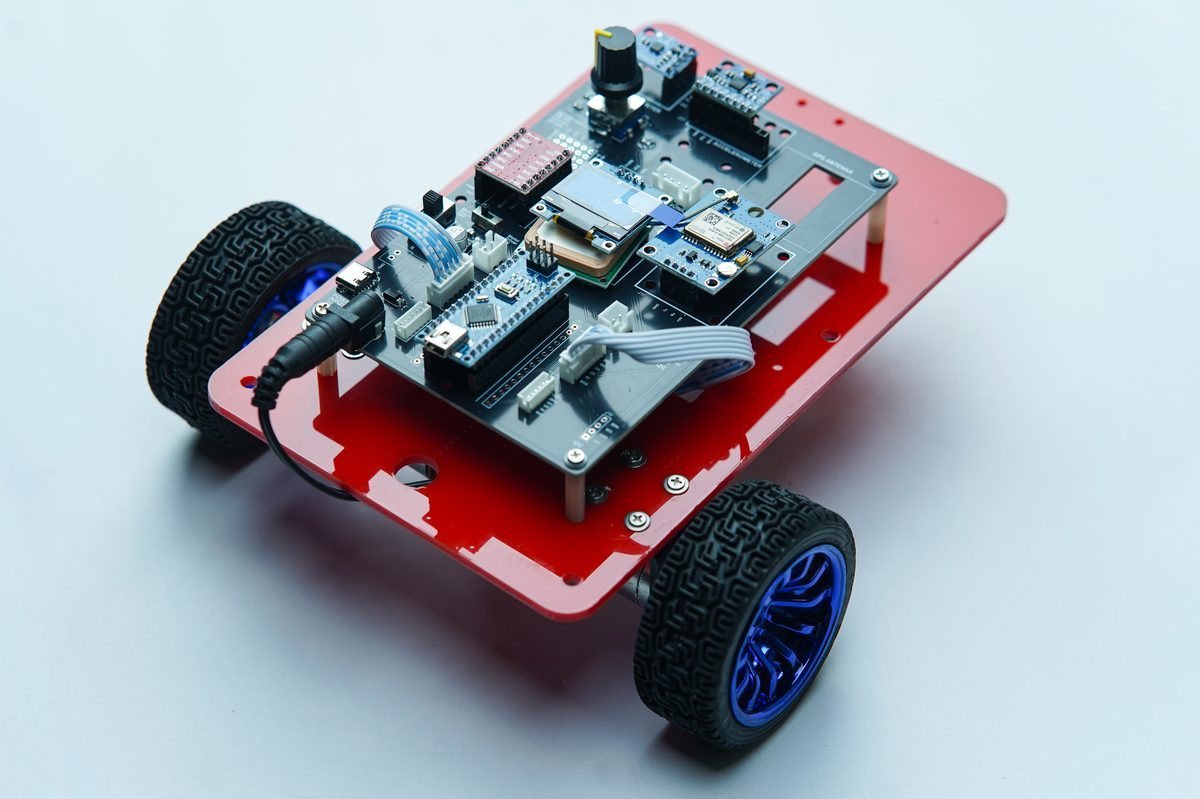
Build an autonomous navigation stack on ZAS Car-5: encoder motor control, ROS2 communication, odometry, LiDAR, SLAM and Nav2.
University / engineering college
Robotics illustration

Course Overview

A university-level autonomous robotics course built around ZAS Car-5. Ten progressive stages add one working capability at a time, from low-level encoder motor control and reliable Raspberry Pi-to-controller communication to ROS2, odometry, perception, mapping and autonomous navigation. The capstone brings the complete pipeline together: choose a goal in RViz, localise in a saved map, plan a route and navigate around an unexpected obstacle.

Hands-on training on ZAS Car-5

Ten progressive stages on Ubuntu 24.04 and ROS 2 Jazzy. The suggested duration is 20-30 hands-on hours. Training dates and enrolment details will be confirmed separately.

Learning Outcome

  • Build encoder-feedback and closed-loop wheel-speed control.
  • Implement a robust Raspberry Pi-to-controller command and status interface with communication-loss safe stopping.
  • Connect ROS2 /cmd_vel commands to physical wheel motion through a motor bridge.
  • Publish encoder odometry and ROS-compatible IMU data and build the robot TF tree.
  • Integrate 2D LiDAR, visualise /scan in RViz and create and save an occupancy-grid SLAM map.
  • Configure localisation and Nav2 planning, control and obstacle avoidance.
  • Deliver a working autonomous navigation stack and demonstrate navigation to an RViz goal with an unexpected obstacle.

Industry Skills

  • Closed-loop encoder motor control and differential-drive kinematics
  • Packet framing, validation, heartbeat and watchdog design
  • ROS2 nodes, topics, messages, publishers and subscribers
  • geometry_msgs/Twist, /cmd_vel and robot motor-bridge integration
  • Encoder odometry, IMU publishing and TF frame configuration
  • LiDAR integration, RViz visualisation and occupancy-grid SLAM
  • Nav2 localisation, costmaps, global planning and local control
  • End-to-end robot integration and navigation testing

Industry Roles

Related role examples inferred from the skills covered; these are not job-placement claims.

  • ROS2 robotics software engineer
  • Autonomous mobile robot integration engineer
  • Robotics navigation / localisation engineer
  • Embedded robotics controls developer

Detailed Syllabus

Each stage combines concepts with a hands-on demonstration on the robot.

01Differential Drive and Encoder Motors
  • Motor direction and PWM control
  • Encoder ticks and wheel speed
  • Differential-drive motion
Hands-on demonstration

Command forward and reverse motion, left and right turns and an accurate 360-degree rotation using encoder feedback.

02Closed-Loop Motor Control
  • Encoder-based wheel velocity measurement
  • Feedback and PID wheel-speed control
  • Why equal PWM does not guarantee equal wheel speed
Hands-on demonstration

Compare open-loop and encoder-controlled straight-line motion and measure the trajectory improvement.

03Robust Raspberry Pi-to-Controller Communication
  • Command / status packets and framing
  • Validation, heartbeat and watchdog
  • Communication-loss safe-stop behaviour
Hands-on demonstration

Drive Car-5 from the Raspberry Pi, interrupt communication and verify that the robot stops safely.

04ROS2 Foundations
  • Nodes, topics, messages, publishers and subscribers
  • geometry_msgs/Twist
  • /cmd_vel as the standard mobile-robot velocity interface
Hands-on demonstration

Publish linear and angular velocity commands from the ROS2 terminal and observe the robot execute them.

05ROS2 Motor Bridge
  • /cmd_vel to differential-drive kinematics
  • Wheel velocity targets and motor commands
  • Connecting ROS commands to physical wheel movement
Hands-on demonstration

Command straight, curved and in-place rotational trajectories through /cmd_vel.

06Encoder Odometry
  • Encoder ticks to wheel displacement
  • Pose estimation: x, y and heading
  • Publishing /odom and examining dead-reckoning error
Hands-on demonstration

Drive a measured square and compare the ROS2 odometry trail with the actual finishing position.

07MPU6050 IMU and Robot Orientation
  • ROS-compatible IMU data
  • Angular velocity, acceleration, bias, noise and drift
  • Comparing inertial and encoder-based rotation estimates
Hands-on demonstration

Rotate through a measured angle and compare encoder-estimated and IMU-estimated heading.

08TF and Robot Coordinate Frames
  • map, odom, base_link and laser frames
  • Sensor and pose relationships
  • Robot and TF-tree inspection in RViz
Hands-on demonstration

Visualise the robot and TF tree in RViz and verify that the LiDAR frame moves correctly with the robot.

09LiDAR Integration and SLAM
  • Publishing 2D laser scans on /scan
  • Obstacle geometry in RViz
  • Occupancy-grid mapping and map saving
Hands-on demonstration

Manually drive around a laboratory or classroom, observe the map build live in RViz and save the finished map.

10Localisation and Nav2 Autonomous Navigation
  • Localisation within a saved map
  • Global planning, local control and costmaps
  • Obstacle avoidance and the complete navigation pipeline
Hands-on demonstration

Select an RViz goal and demonstrate localisation, route planning, autonomous motion and a response to an unexpected obstacle before reaching the destination.

Inside the course

Explore the robot, course introduction and demonstrations below.

Training Hardware

  • Raspberry Pi 4 / 5 for Ubuntu and ROS2 compute
  • Dedicated real-time motor and sensor controller
  • 2 x encoder DC motors
  • TB6612 motor driver
  • MPU6050 IMU
  • 2D LiDAR

What You Will Build

  • ROS2 Car-5 workspace and robust motor bridge
  • Encoder odometry and MPU6050 integration
  • LiDAR integration and robot TF tree
  • A SLAM-generated map
  • Nav2 configuration
  • An autonomous navigation demonstration

Course Documents

KEEP EXPLORING

More in Robotics